Virtual: A Handwritten Font That Fits Real Workflows
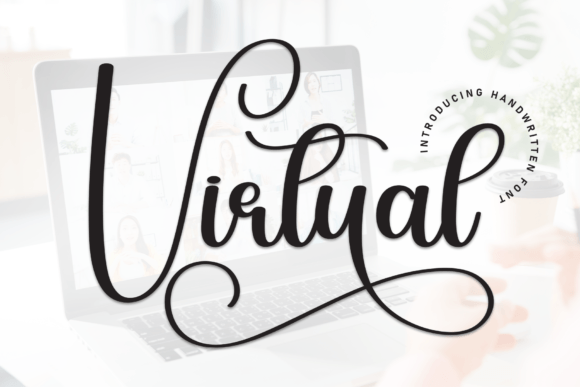
Virtual isn’t just another decorative typeface—it’s a functional design asset built for people who value authenticity without sacrificing clarity. Its relaxed, slightly uneven strokes mimic natural handwriting, giving digital text the warmth of a personal note. Unlike rigid, overly polished fonts, Virtual invites connection. It signals approachability, creativity, and intention—not perfection. That makes it especially useful in contexts where tone matters as much as content: invitations, brand storytelling, social media visuals, classroom materials, small business signage, and handmade product packaging.
Where Virtual Fits in Your Creative or Communication Process
Think of Virtual not as an afterthought, but as a deliberate choice made early in your workflow—often during the planning or mood-setting phase. Before you write copy for an event invitation, sketch a social post layout, or finalize a brand guideline, selecting Virtual helps anchor the emotional direction of the piece. It’s a signal to yourself and your collaborators: “This is meant to feel human, not automated.”
For educators designing lesson handouts or educators sharing weekly updates with parents, Virtual adds visual softness that reduces cognitive load—making information feel more digestible and less formal. For freelancers building client-facing assets—like pitch decks or service overviews—using Virtual on headers or quotes subtly reinforces personality and trust, differentiating their work from templated competitors.
Using Virtual Before the Project Begins
Preparation matters. Before importing Virtual into a design tool, verify licensing. It’s available in both desktop and web formats, but usage rights vary by vendor. If you’re using it for client work, confirm whether your license covers commercial redistribution—especially if delivering editable files (e.g., .psd or .fig) or embedding in email templates.
Also consider pairing early. Virtual works best when balanced against a clean, highly legible sans-serif (like Inter, Open Sans, or Lato) for body text. This contrast supports readability while preserving personality. Test combinations at multiple sizes: Virtual shines at 24–60pt for headlines or short phrases, but becomes hard to parse below 18pt in extended paragraphs.
- Pro tip: Save your go-to Virtual + sans-serif pair as a preset in Figma, Adobe Express, or Canva—so it’s one click away next time.
- Pro tip: Create a simple style guide snippet showing approved use cases: “Virtual for headings only; never for captions, data labels, or legal disclaimers.”
Using Virtual During Execution
During active creation—whether drafting an Instagram carousel, laying out a wedding suite, or building a landing page—Virtual serves two practical functions: hierarchy reinforcement and emotional framing.
It naturally draws attention. Use it for callouts (“Limited spots!”), handwritten-style quotes in blog graphics, or personalized CTAs (“Let’s chat →”). Because its letterforms have irregular spacing and slight variations in stroke weight, avoid tight tracking or all-caps settings—those amplify inconsistency and hurt legibility. Instead, let Virtual breathe: generous line height, ample margins, and minimal effects (no heavy shadows or outlines).
If you’re collaborating across tools—say, a marketer designing in Canva while a developer implements the site in Webflow—confirm how Virtual will render. Desktop versions won’t auto-load in browsers unless properly embedded via @font-face or a service like Google Fonts (if available there) or Adobe Fonts. For web use, always supply fallbacks: font-family: "Virtual", "Comic Neue", cursive;. That ensures tone stays warm even if Virtual fails to load.
Real-World Workflow Integration Examples
A small bakery owner uses Virtual in Canva to design weekly Instagram Stories announcing new pastries. They pair it with Montserrat for ingredient lists and pricing—keeping the voice friendly but scannable. Because they post consistently every Tuesday, they’ve saved three Virtual-based Story templates (seasonal, promo, behind-the-scenes), cutting design time by 60%.
An online course creator applies Virtual to section headers in PDF workbooks and slide decks—but only where learners are meant to pause and reflect. They avoid it in code snippets or step-by-step instructions, reserving clarity-focused fonts there. This intentional contrast trains learners’ eyes: “This part is for feeling; that part is for doing.”
A freelance graphic designer includes Virtual in their standard brand identity package—but only as a secondary display font, clearly labeled in the style guide with usage boundaries. Clients appreciate the specificity: it prevents misuse (like cramming Virtual into tiny footer text) and speeds up revisions.
Using Virtual After Delivery
Once a project ships, Virtual continues to play a role—in consistency and evolution. Track where it appears: Does it show up across email newsletters, printed menus, and social bios? If so, audit those touchpoints quarterly. Small shifts—like switching from a free version to the full licensed family (which may include alternate weights or ligatures)—can refine tone without rebranding.
Also watch for fatigue. Overuse dulls impact. If Virtual appears on every banner, button, and testimonial, its charm fades. Rotate it seasonally or reserve it for high-emotion moments: welcome emails, milestone announcements, or community thank-yous.
Compatibility, Organization, and Long-Term Use
Virtual integrates smoothly with most modern design and publishing tools—Figma, Adobe Creative Cloud, Canva, Affinity Suite, and even Notion (via custom CSS or image-based headers). But organization matters: store the .otf/.woff2 files in a shared team assets folder with clear naming (Virtual-Regular.woff2, Virtual-Bold.otf) and a README noting license scope and preferred pairings.
For teams, document usage rules—not as restrictions, but as quality safeguards. Example: “Use Virtual only for short, emotionally resonant text (≤12 words). Never for accessibility-critical content like form labels or error messages.” This protects both brand voice and user experience.
Long-term, revisit Virtual every 6–12 months. Does it still reflect your current voice? Has your audience’s expectations shifted? A font isn’t static—it lives inside evolving workflows, platforms, and relationships. Updating its application (not necessarily replacing it) keeps communication fresh and grounded.
What to Watch For
Virtual’s strength—its organic irregularity—is also its constraint. It doesn’t scale down well. Avoid it in data visualizations, mobile navigation bars, or anywhere users need rapid comprehension. Likewise, steer clear in multilingual projects unless you’ve verified glyph coverage for accented characters or non-Latin scripts.
And remember: legibility isn’t optional. If a colleague squints at a mockup or a client asks, “Is that a ‘g’ or a ‘q’?”, it’s time to adjust spacing, size, or switch fonts entirely. Virtual earns trust by being *intentionally* imperfect—not confusingly vague.
Ultimately, Virtual works because it respects process. It doesn’t rush you into decoration. It asks you to consider context first: Who’s reading this? What do they need to feel—and know—before they act? When used with that kind of attention, Virtual stops being just a font and becomes part of your workflow’s quiet intelligence.