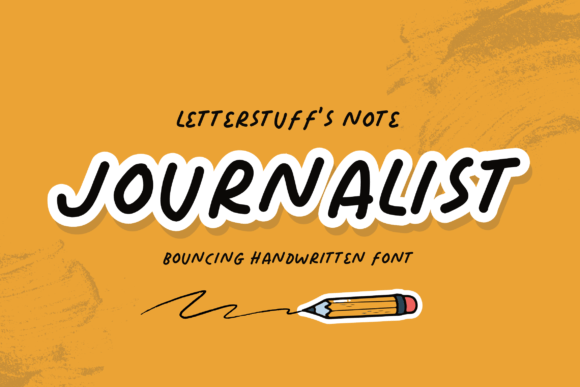
Journalist Font: Handwritten Fluidity, Global Clarity
Imagine a font that feels like it was sketched mid-thought—confident, rhythmic, and alive—with the quiet authority of someone who’s spent years shaping stories. That’s Journalist: not just another handwritten typeface, but a carefully engineered balance of bounce, legibility, and linguistic range. It doesn’t imitate handwriting—it interprets it: fluid enough to feel human, structured enough to hold its own on a retina display or printed newsletter.
What sets Journalist apart isn’t novelty for novelty’s sake. It’s intentionality. Every curve is calibrated for screen readability at small sizes; every ascender and descender clears space without sacrificing personality. And crucially, it supports over 200 languages—including extended Latin, Cyrillic, Greek, Vietnamese, and major accented European scripts—without switching fonts or compromising spacing. That means your bilingual blog post, your multilingual social campaign, or your inclusive educational slide deck stays visually cohesive, no workarounds needed.
Where Journalist Fits in Real Creative Work
Designers often reach for handwritten fonts to signal authenticity—but many falter at scale. They blur on mobile, collapse in dense paragraphs, or break when you add diacritics. Journalist avoids those pitfalls by design. Its open counters, generous x-height, and consistent stroke rhythm keep text scannable—even at 14px on a phone screen. That makes it unusually versatile across formats:
- Digital newsletters: Use Journalist for headlines and pull quotes to add warmth without sacrificing professionalism. Pair it with a clean sans-serif (like Inter or Manrope) for body copy—creating hierarchy that guides readers, not distracts them.
- Social media graphics: On Instagram carousels or LinkedIn banners, Journalist’s bounce adds energy to short, impactful statements—“Why this matters,” “What changed,” “Here’s what’s next.” Avoid long paragraphs; instead, use it for 3–5 word emphasis points aligned with visual rhythm.
- Editorial layouts: Magazines, digital zines, or Substack features benefit from Journalist’s narrative tone. Try it for section dividers, author bylines, or sidebars—never for full articles, but always where voice needs to surface.
Practical Adaptations Across Roles
You don’t need to be a typographer to use Journalist well. How you apply it depends less on expertise and more on clarity of intent—and your audience’s context.
For marketers and small business owners: Journalist helps soften brand messaging without losing credibility. A bakery might use it for seasonal menu headers (“Summer Berries • Just Picked”) while keeping product descriptions in a neutral font. The contrast feels intentional—not decorative. Test it in email subject lines (short ones only) or limited-edition campaign assets where personality reinforces trust.
For educators and creators: Think about accessibility first. Journalist isn’t meant for body text in learning materials—but it works powerfully in slide titles, worksheet headers, or student-facing infographics where tone matters. One teacher uses it for weekly reflection prompts (“What surprised you?” “Where did you pause?”), then switches to Open Dyslexic for reading passages. The shift signals a change in mode: from invitation to engagement, to focused comprehension.
For bloggers and freelancers: Journalist shines in visual storytelling—especially when paired with strong photography or illustration. Try using it consistently for image captions across a portfolio site. Not as decoration, but as a signature rhythm: same weight, same size, same vertical alignment. Over time, that repetition builds subtle recognition—readers begin to associate that gentle bounce with your voice.
Keeping It Effective—Not Just Expressive
Expressiveness without control can dilute impact. Here’s how to stay grounded:
- Limits create strength. Restrict Journalist to one or two roles per project—headline + pull quote, or logo + CTA button. More than that blurs hierarchy and weakens its distinctiveness.
- Test before you commit. Preview text in real contexts: paste a headline into your email client, load it on an actual Android device, check contrast against your background color. Journalist’s light weight demands careful pairing—avoid pale grays on white or thin strokes on busy photos.
- Respect language logic. Even with broad multilingual support, test critical phrases in your target language—not just letters, but common ligatures, spacing around punctuation, and line breaks. A French phrase with multiple accents should flow naturally, not jam or stagger.
Consistency doesn’t mean repetition. You can vary Journalist’s effect through weight (it includes Light, Regular, and Bold), size contrast, and color—not by forcing it into roles it wasn’t built for. One newsletter uses Regular for headlines, Bold for callouts, and Light for subtle footer notes. Same font family, three clear functions.
Ideas That Spark—Not Just Inspire
Instead of vague prompts like “be creative,” here are specific, actionable starting points:
- Create a tone guide for your team: Define exactly when Journalist appears (e.g., “Only in hero sections and quote blocks”) and when it doesn’t (e.g., “Never in data tables or legal disclaimers”). Share it as a living doc—not a rulebook, but a shared reference.
- Run a font audit on your current website or newsletter. Note where personality feels missing—or where typography competes with content. Replace one overused element (like all-caps headings) with Journalist in Regular weight, sized 20% larger. Measure engagement changes over two weeks.
- Build a multilingual moodboard: Collect five real phrases—in Spanish, Arabic, Polish, Japanese (romaji), and English—that reflect your brand’s core message. Set them in Journalist. Adjust tracking if needed, but don’t substitute fonts. See how rhythm holds across scripts.
Journalist isn’t about making everything look “handmade.” It’s about giving digital text a pulse—something that breathes with the reader, not against them. It’s useful because it solves real problems: how to stand out without shouting, how to include without compromising, how to express voice without sacrificing function.
That’s why it resonates across such varied users—from a freelance illustrator designing a pitch deck, to a nonprofit crafting donor updates, to a language tutor building printable worksheets. The tool adapts, but the principle stays constant: typography serves the message, not the other way around.
If you’ve ever hesitated to use expressive type because it felt risky or inconsistent, Journalist offers a middle path—human, but held. Try it where voice matters most. Then step back, watch how people read, and adjust—not to follow trends, but to meet your audience where they are.