Aqille: A Stylish Handwritten Font for Purposeful Branding and Design
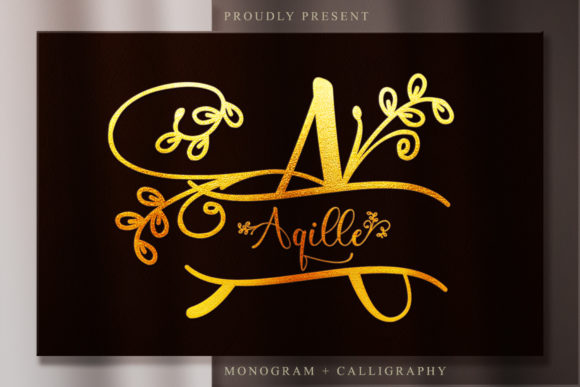
Aqille is a carefully crafted handwritten font that balances elegance with usability. It’s not just decorative—it’s engineered to support real-world design decisions, from early-stage concepting to final delivery across digital and print channels. Whether you’re refining a logo, preparing social media assets, or designing packaging for a new product launch, Aqille serves as both a visual tool and a strategic asset. Its stylistic clarity helps communicate tone and intention without sacrificing legibility or versatility.
Where Aqille Fits in Your Creative Workflow
Fonts are rarely chosen in isolation—they’re selected in context. Aqille enters your process at the point where voice, audience, and medium converge. Before finalizing brand guidelines, many designers test several script fonts alongside sans-serif or serif pairings; Aqille often stands out because it maintains character without overwhelming supporting text. During mockup phases—whether in Figma, Adobe Illustrator, or Canva—it integrates cleanly into layered compositions, especially when used for headlines, quotes, or callouts. After export, its PUA (Private Use Area) encoding ensures swashes, alternates, and ligatures remain accessible across platforms, reducing last-minute font substitution issues.
For small business owners launching a new service, Aqille might appear first on a landing page headline, then reappear consistently in email headers and Instagram story templates. That continuity isn’t accidental—it’s enabled by how easily Aqille adapts to different file formats and rendering environments. Educators building course materials may use it for slide titles or printable quote cards, appreciating how its warmth supports engagement without distracting from content. Bloggers testing visual hierarchy often find Aqille effective for post titles paired with clean body fonts like Inter or Lora.
Practical Integration Across Platforms and Tools
Compatibility matters most when time is tight. Aqille works reliably in desktop applications like Adobe Photoshop, Illustrator, and InDesign, as well as web-based tools including Figma, Canva, and Webflow. When embedding Aqille into websites via @font-face, its OTF or TTF files load efficiently, and its PUA encoding means custom glyphs—like flourished capitals or contextual swashes—can be triggered using OpenType features or Unicode shortcuts. No plugins or special software are required.
For social media managers scheduling posts across Meta, Pinterest, and X, Aqille shines in static visuals: quote graphics, limited-edition announcement banners, or seasonal campaign headers. Because its letterforms have consistent spacing and rhythm, resizing for mobile previews rarely introduces awkward gaps or collisions. Print designers benefit similarly—Aqille scales well from business card text to large-format signage, retaining its graceful flow at 12 pt and 120 pt alike.
It pairs naturally with neutral typefaces. Try pairing Aqille with Montserrat for modern contrast, or with Playfair Display for classic harmony. Avoid overloading layouts with multiple script fonts—Aqille performs best when given breathing room and purpose. One headline, one tagline, one signature element per composition tends to yield stronger recall than scattered usage.
Preparing and Organizing Your Aqille Files
Start by installing the font family correctly on your system. Keep the original ZIP archive backed up, and rename folders clearly—for example, “Aqille_v2.1_OTF” rather than “font1.” Within design projects, maintain a “fonts” subfolder if sharing files with collaborators, and document which version and glyph set you’ve used (e.g., “Aqille Swash Caps enabled via Character Panel”). This avoids version mismatches during handoff or revision cycles.
If you’re managing assets across teams, consider creating a lightweight style guide snippet: a PDF or Notion page showing Aqille in approved sizes, weights, and pairings, along with do’s and don’ts. Example: Do use Aqille for primary headlines only. Don’t use it for body copy below 16 px on screen. Clear boundaries prevent inconsistent application and preserve its impact.
Using Aqille With Intention—Not Just Decoration
Elegance doesn’t equal complexity. Aqille’s strength lies in its restraint: each curve is deliberate, each terminal refined—not overly ornate, not underdeveloped. That makes it suitable for contexts where credibility and approachability matter equally: wellness brands, boutique publishers, academic workshops, artisanal product labels. It signals care without pretension.
Before committing Aqille to a permanent asset—like a logo or website header—test it across devices and lighting conditions. View it on a phone in daylight, on a laptop at night, and printed on uncoated paper. Does the contrast hold? Do swashes remain legible at smaller sizes? These checks take five minutes but prevent costly revisions later.
Also consider accessibility. While Aqille itself isn’t intended for long-form reading, ensure any text set in it meets minimum contrast ratios (4.5:1 against background) and avoid using it for interactive elements like buttons or form labels where clarity trumps style.
Long-Term Use and Consistency
Brands evolve—but consistency builds recognition. If you adopt Aqille for your primary headline treatment, revisit that choice every 6–12 months. Ask: Is it still aligned with your audience’s expectations? Does it reflect current offerings? Has its technical performance changed with OS or browser updates? Most users won’t notice subtle shifts—but repeated inconsistencies erode trust over time.
Keep a log of where Aqille appears: website headers, invoice footers, podcast cover art, presentation decks. Spot-check quarterly. If usage has drifted—say, from occasional accent to overuse across all touchpoints—realign with your original intent. That discipline keeps Aqille effective, not exhausting.
Real-World Implementation Examples
- Freelancers: Use Aqille in proposal covers and client presentation decks to reinforce professionalism and personal voice—then switch to a neutral body font for readability.
- Educators: Apply Aqille to weekly reflection prompts or printable quote cards for student journals; its warmth encourages engagement without infantilizing content.
- Small retailers: Feature Aqille on product tags and seasonal window decals, ensuring the same weight and spacing appears across physical and digital storefronts.
- Bloggers: Set post titles in Aqille with CSS
font-feature-settingsto activate swashes selectively—only on first letters or key words—to add polish without clutter. - Marketers: Build reusable Canva templates with Aqille preloaded, so team members apply it consistently across campaigns without needing font installation.
Aqille isn’t about chasing trends—it’s about selecting a tool that supports your goals with quiet confidence. It works because it’s designed for execution, not just aesthetics. When your workflow values clarity, cohesion, and craft, Aqille becomes more than a font: it becomes part of your operational rhythm.